A call center call flow is the set of routing rules your phone system runs on every inbound call. It checks the hours, plays a greeting, offers a menu, puts the call in a queue and decides what happens when nobody can take it. Each of those steps also needs an exit for the case that goes wrong, and the exits are the part that tends to be left off the diagram.
This guide splits a flow into the blocks it is built from, with what Amazon Connect and Genesys Cloud call each one. Then come three example flows (the first one drawn as a diagram), the branches that get forgotten, and a test sheet with a call for each branch. It stays on routing; numbers, staffing and the rest of the setup are in the inbound call center guide.
What is a call flow in a call center?
A call flow is the decision tree behind a phone number. It starts when a call arrives on a number assigned to the flow and ends when the call reaches a person, a queue, an outside number, a recorded message or a hang-up. A call flow diagram draws that tree, with each decision as a diamond and each step as a box.
The term also gets used for the conversation an agent follows after answering: greet, verify, find the reason, resolve, wrap up. That is a script, and it begins where the routing flow ends. The phone system administrator usually maintains one and a team lead or trainer the other, so it helps to keep them in separate documents.
The diagram and the configured flow drift apart over time. Someone adds a menu option during a busy week, and the drawing on the shared drive no longer matches what callers hear. Treat the configured flow as the source of truth and redraw the diagram from it after every change.
What are the building blocks of a call flow?
An inbound flow is usually built from seven blocks: an hours check, a greeting, a menu, a queue, the wait in queue, a transfer to an outside number, and a callback or end. Each block has a normal path and at least one failure path. The table names the failure path for each, along with what two common contact center platforms call the block.
| Block | What it decides | The failure path it needs | Amazon Connect block | Genesys Cloud Architect |
|---|---|---|---|---|
| Hours check | Open, closed, holiday or emergency | A closed path, plus holiday and emergency messages that take priority over normal hours | Check hours of operation | Evaluate Schedule Group |
| Greeting | What every caller hears first, including any recording notice your counsel requires | None, though every caller sits through every second of it | Play prompt | Play Audio |
| Menu | The caller's reason, by keypad or by speech | No input, a key that is not an option, and a way to reach a person from every level | Get customer input | Menu |
| Queue | Which team takes the call, and in what priority | The queue is full, or nobody is logged in | Set working queue, then Transfer to queue (Check staffing can test for agents first) | A transfer to the queue |
| Wait in queue | What callers hear, and what happens as the wait grows | A wait limit that sends the caller to overflow or a callback | A customer queue flow, with Loop prompts and Check queue status | An in-queue flow |
| Outside transfer | Sends the call to another number, such as an on-call line, a partner or an AI agent | The transfer does not connect | Transfer to phone number | Transfer to Number |
| Callback or end | Takes a number for a callback, or ends the call | A callback list with an owner and a deadline | Set callback number, Disconnect / hang up | Create Callback, Disconnect |
The block names come from each vendor's documentation: Amazon's flow block definitions, and Genesys Cloud's articles on Evaluate Schedule Group, Menu, Transfer to Number, Create Callback and Disconnect. Other platforms use their own labels for the same seven jobs.
A few details in that documentation decide what a flow does when nobody planned for the edge case:
- Hours. Amazon Connect's Check hours of operation block can carry extra branches for overrides, for example a holiday greeting before the standard out-of-hours path. Genesys Cloud evaluates schedules in a fixed order (Emergency, Holiday, Closed, Open), and when none of the defined schedules covers the time of a call, the flow takes the Closed path. So an hour missing from the open schedule closes the line for that hour.
- Menus. Amazon Connect's Get customer input block waits up to a set number of seconds, 180 at most, for the first keypress before it times out. Genesys Cloud's Menu action has a default choice for when the option a caller picks is unavailable, plus a setting for how many times the menu repeats.
- Queues. Amazon Connect's Transfer to queue block checks whether the queue is at capacity, comparing the contacts already waiting with the queue's maximum, before it places the call.
- Outside transfers. Genesys Cloud's Transfer to Number action has a Success path and a Failure path, and a connect timeout that sets the longest the system waits before it ends the attempt.
- Exits. The Genesys Cloud Disconnect article puts the case for an exit plainly: "If you leave callers in a menu that lacks an exit path, they may feel trapped, and may dislike the system."
Call center call flow examples
Three flows cover the common cases. The first is a single support line with hours, a menu option and overflow. The second is a menu that splits calls by skill and gives transferred calls a faster lane, and the third is an outsourced line where the number dialed decides which client's flow runs. Each is written as branches you can copy into a diagram.
Example 1: a support line with hours, an AI option and overflow
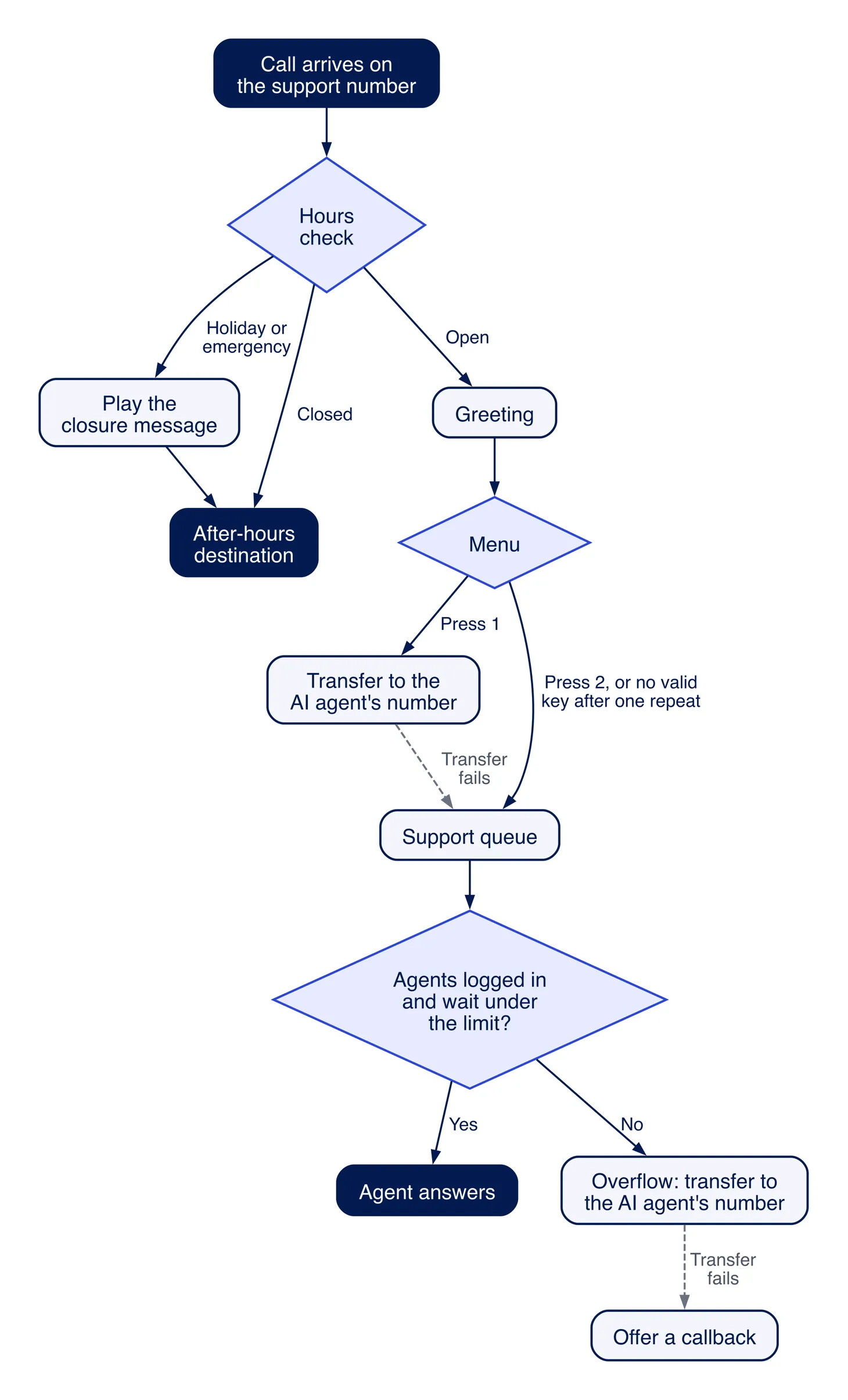
- The call arrives on the support number, which is assigned to this flow.
- Hours check. Holiday or emergency: play the closure message, then send the call to the after-hours destination. Closed: send it to the after-hours destination. Open: continue.
- Greeting: short, with any recording notice.
- Menu: press 1 to talk to the AI assistant now, or press 2 to wait for a person. No input, or a key that is not an option: play the menu once more, then put the call in the support queue.
- Option 1 transfers the call to the AI agent's number. If that transfer fails, the call goes to the support queue.
- Support queue. If nobody is logged in or the wait passes your limit, the call overflows to the AI agent's number. If the overflow transfer fails, offer a callback.
- The after-hours destination is whatever covers the line at night, such as an AI agent, an answering service or an on-call number for urgent calls.
Callers who don't choose the menu option keep their place in line. Protect that in any flow that adds a self-service option, because a caller who would rather wait for a person should not lose their spot for it (hold queue relief).
Example 2: a skills menu with a faster lane for transfers
- Hours check and greeting as in Example 1.
- Menu: 1 for orders and billing, 2 for technical support, 3 for anything else. Pressing 0 at any level goes to the general queue, and so does no input.
- Each option sets its own queue. A call into a queue with nobody logged in goes to the general queue, and if that is empty as well, to a callback offer.
- When a tier-1 agent transfers a call to tier 2, it enters the tier-2 queue at a higher priority, so the caller does not wait behind new calls a second time. In Amazon Connect, the Change routing priority / age block is one way to do it; it can move a contact to the front of the queue.
- Calls handed back from outside (an AI agent, an answering service, a partner) arrive on a separate number or direct line. Its flow skips the greeting and menu and goes straight to the right queue at the higher priority.
Step 5 is the easiest one to leave off a diagram. A handoff that dials the main number puts the caller back at the greeting and the end of the queue after they have already explained the problem once.
Example 3: an outsourced line where the number picks the client
- Each client program has its own number, and the platform runs a separate flow per number. Amazon Connect attaches each claimed or ported number to a flow, and Genesys Cloud's call routing maps telephone numbers to call flows.
- Hours check against the client's schedule, in the client's time zone.
- Greeting in the client's name, then the client's menu.
- The client's queue, staffed by the agents trained on that program.
- Escalations transfer to the client's own escalation number, under the client's rules.
- Reporting splits by number, so each client's service level and abandonment come from its own calls.
Any automation on the line needs the same separation. An AI agent answering one client's number should carry only that client's knowledge and transfer rules, and its call records should land in that client's reports.
Where does an AI agent fit in a call flow?
An AI agent fits a call flow as one more outside destination with its own phone number, so adding it means pointing a transfer block at that number. It usually goes in one of four places: a menu option callers choose, the overflow when the wait passes a limit or nobody is logged in, the after-hours path, or a dedicated number for one program or client.
Overflow and after hours take the calls the roster would never reach (after hours and overflow). A menu option takes only the callers who pick it, and a dedicated number gives one program its own agent, as in Example 3.
The design question that gets skipped is the way back to a person. Before adding any AI agent to a flow, get answers on these:
- What number does a handoff dial, and can that number feed a priority queue or a direct line instead of the main greeting?
- Which caller ID does the person see on a handoff, the caller's number or the agent's?
- Does the person get a briefing before they pick up, or do they read the call record afterward?
- What happens when the handoff number doesn't answer?
- Which call types end in a handoff, and where do the reports show it?
Which call flow branches get forgotten?
The forgotten branches are the ones a normal test call never takes: no keypress, a key that is not an option, a holiday, an hour missing from the schedule, an emergency closure, a full queue, nobody logged in, an outside transfer that does not connect, and a caller who asks for a person halfway through the menu. Each needs a destination written down before go-live.
| Branch | Why it gets missed | What to set |
|---|---|---|
| No input at the menu | Testers always press something | Play the menu once more, then send the call to a general queue |
| A key that is not an option | Same reason | A short "that is not one of the options" message, then the menu once more |
| Holiday | The schedule was built for a normal week | Every holiday for the year entered in advance, checked each quarter |
| An hour missing from the schedule | The schedule and the roster were edited separately | Compare the open schedule with the roster after every schedule change |
| Emergency closure, such as weather or an outage | Nobody wants to edit a live flow in a crisis | An emergency schedule or override a supervisor can switch on without editing the flow |
| Queue full | Capacity limits sit in the queue settings, off the diagram | An at-capacity branch to overflow or a callback offer |
| Nobody logged in | It happens at shift edges and during team meetings | A staffing check before the queue, routed to overflow |
| Outside transfer fails | The destination always answered in testing | A failure path back to a queue or to a callback offer |
| Caller asks for a person | The menu was designed around its options | Pressing 0, or saying "agent", reaches a person from every level |
The callback branch carries one more requirement: somebody has to work the list. A callback offer with no owner and no deadline just moves the abandoned call to the next morning.
How do you test a call flow before it goes live?
Test a call flow with one call for every branch, including the branches a normal caller rarely takes. Write each branch as a row that says how to trigger it and where the call should end, place each call from an outside phone, and mark a row passed only when the call lands where the row says. Run the sheet again after every change to the flow.
| # | Branch | How to trigger it | Passes when |
|---|---|---|---|
| 1 | Each menu option, open hours | Call during staffed hours and press each option in turn | Each option reaches its own destination |
| 2 | No input | Stay silent through the menu | The menu plays once more, then the call reaches the general queue |
| 3 | A key that is not an option | Press a key the menu does not offer | The message plays, then the menu once more |
| 4 | Asking for a person | Press 0 or say "agent" at every menu level | Each level reaches a person's queue |
| 5 | Closed hours | Call outside staffed hours, or use a test schedule in a copy of the flow | The call reaches the after-hours destination |
| 6 | Holiday | Add today as a holiday in a test schedule | The holiday message plays, then the after-hours path |
| 7 | Nobody logged in | Log every agent out of a test queue | The call overflows to the destination you set |
| 8 | Wait past the limit | Lower the wait limit on a test queue and hold a call in it | The call overflows, or the callback offer plays, at the limit |
| 9 | Queue full | Set the test queue's maximum to one and place two calls | The second call takes the at-capacity branch |
| 10 | Outside transfer fails | In a copy of the flow, point the transfer at a number that does not answer | The call follows the failure path |
| 11 | Handoff back from an AI agent | Choose the AI option and ask for a person | The call arrives on the priority line, showing the caller ID you chose |
| 12 | Callback | Ask for a callback | The request appears on the list with the right number |
Dial the published number from an outside phone. A call from an internal extension may not take the same path through the carrier, or show the caller ID a customer's call would. In Amazon Connect, the Set logging behavior block turns on flow logs that track events as a contact moves through the flow, so a failed row can be traced to the block where it went wrong.
Once the flow is live, its own numbers show which branches callers take: where calls end in the menu, how many reach the queue, and how many leave before anyone answers. The call center IVR guide has the six to read and where each lives in Amazon Connect and Genesys Cloud reports. The conversational IVR guide has a worksheet for deciding which menu options should be resolved instead of routed, and queue-side numbers such as service level and abandonment are in call center metrics and KPIs.
How Telvana plugs into an existing call flow
A Telvana agent answers on its own phone number, so it joins your flow as an outside transfer: a menu option such as "Press 1 to talk to our AI assistant now", an overflow or after-hours forwarding rule, or the agent's number published on its own (connecting your phone system). Any phone system that can transfer or forward a call to an outside number can send calls to it.
On the call, the agent answers from your knowledge base and books, reschedules and cancels appointments in the tools you connect. When a caller needs a person, it transfers to the number you choose, under rules you set. Point that number at a priority queue or a direct line so callers don't start again at the back, and choose whether the person sees the caller's number or the agent's. The transfer is an ordinary call, so the person who picks up reads the transcript and summary afterward. Every call is recorded, transcribed, summarized and tagged by outcome. An outsourced center gets a separate workspace for each client program, which is how OakTech Systems runs its clients' programs.
Our team builds the agent from your scripts, FAQs, policies and transfer rules and tests it on your call types before it takes a live call. Pricing starts at $399 a month based on call volume, plus a one-time setup fee (pricing).
Frequently asked questions
What is a call flow in a call center?
A call flow is the set of routing rules a phone system runs on each inbound call: the hours check, the greeting, the menu, the queue, and what happens when nobody can answer. It ends when the call reaches a person, a queue, an outside number, a message or a hang-up.
What is a call flow diagram?
A call flow diagram is a drawing of those rules, usually with a box for each step, a diamond for each decision and an arrow for each path. It is most useful when every diamond shows all of its exits, including no input, closed hours and a full queue.
What is the difference between a call flow and an IVR?
The IVR is the menu step inside a call flow, where callers press keys or say what they need. The call flow also covers the hours check, the queues, overflow, outside transfers, callbacks and how each call ends.
What is the difference between a call flow and a call script?
A call flow routes the call to the right place. A call script is what the person or AI agent says once the call arrives: the greeting, the identity check, the questions and the wrap-up. They are usually kept in separate documents.
How do you test a call flow?
Place a test call for every branch from an outside phone, including the ones a normal caller rarely takes: no input, a wrong key, a holiday, nobody logged in, a full queue and a failed outside transfer. A branch passes only when the call ends where the flow says it should.
Can an AI agent be part of a call flow?
Yes. An AI agent with its own number is added as an outside transfer, at a menu option, the overflow, the after-hours path or a dedicated number. Set the number its handoffs dial so callers who need a person reach a priority queue rather than the start of the menu.
Bring your call flow to a demo
Book a demo and bring your current call flow, or a photo of the diagram, along with your top call types. We'll show which calls an agent could take and where it would sit in your flow, and you can hear it take one.